Legal Agent: A Word AI Agent Specialized for Legal Work


Hello, I'm Noriaki Asato, Representative Attorney at LegalAgent.
A Legal Support Agent That Lives Inside Word
We have launched "Legal Agent," a Word AI Agent specialized for legal work. Detailed features and an overview are available on the following page: Word AI Agent Specialized for Legal Work
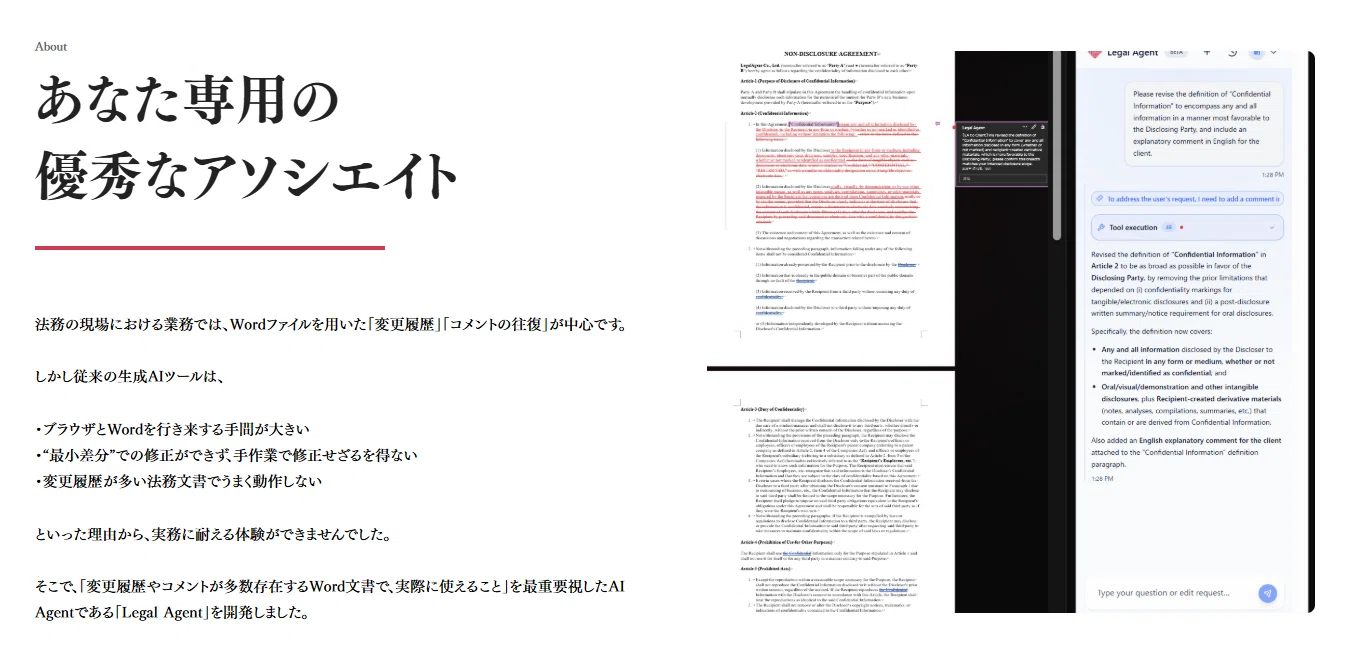
Legal Agent is an AI Agent specialized for legal work, developed to support day-to-day legal practice. It sits on the Word screen, prepares proposed revisions to documents based on the user's instructions, and adds comments that supplement the background. It feels as though an excellent associate dedicated to you is standing by right next to your screen, allowing you to revise contracts and other documents and prepare the groundwork for drafting. We also offer a Free Plan so you can easily try out the features, so please make use of it in line with your daily work.
Workload and Staffing Challenges in Legal Practice
Attorneys at law firms and in-house legal staff at companies want to respond to the requests of clients and business divisions and deliver fast, high-quality support. In actual practice, however, many checks and revisions are done by hand, and preparing deliverables in a short time has required a considerable number of people. At the same time, hiring legal professionals with practical experience is not easy, and training them also takes a considerable amount of time.
In addition, hierarchical structures have been the norm at traditional law firms. For a single matter, the workflow involves multiple rounds of back-and-forth before anything is submitted externally: initial handling by staff, review by an associate attorney, review and instructions by a partner attorney, and further revisions. Because everyone checks carefully, the structure inevitably tends to require a certain amount of time.
The frustration of wanting to respond quickly in step with the speed of business divisions, yet being unable to move as fast as hoped because of the effort involved and staffing constraints, is common across legal departments. Reducing the workload of each person and creating an environment where they can focus on substantive judgment has therefore become a practical challenge.
Challenges in Editing Word Documents and Managing Revision History
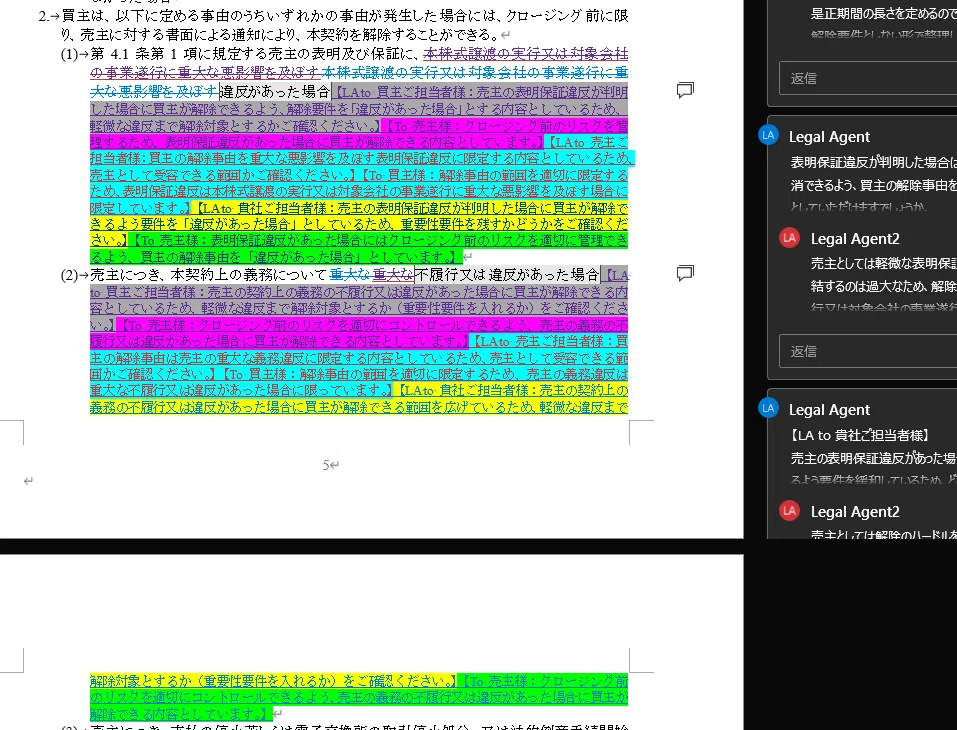
A Word screen with layered tracked changes and comments
Most day-to-day legal work consists of revising clauses in Word files and going back and forth with the counterparty and internal stakeholders while conveying the intent of revisions through tracked changes and comments. In my practical experience, the following elements of editing quality greatly affect how smoothly the work goes.
Formatting the revised passages properly and making sure the intent comes across in the comments. It is important to maintain consistency of content through multiple rounds of exchanges and keep the document readable even as tracked changes pile up. Sorting out the issues in advance is of course a prerequisite, but the finish of the final document also affects how the matter progresses. General-purpose generative AI tools can revise and summarize text, but in my practical experience at the time, I sometimes ran into the following snags in the work.
Copying text back and forth between a browser and Word interrupts the work every time. In the environments I tried at the time, accurately reading layered tracked changes and comments and fixing only the necessary parts also took effort. As long as I kept manually pasting generative AI output back into Word documents and manually tidying up the formatting and revision history, there was the frustration that, despite adding a tool, the hands-on effort did not decrease much.
Developing a Tool Suited to the Practice Environment
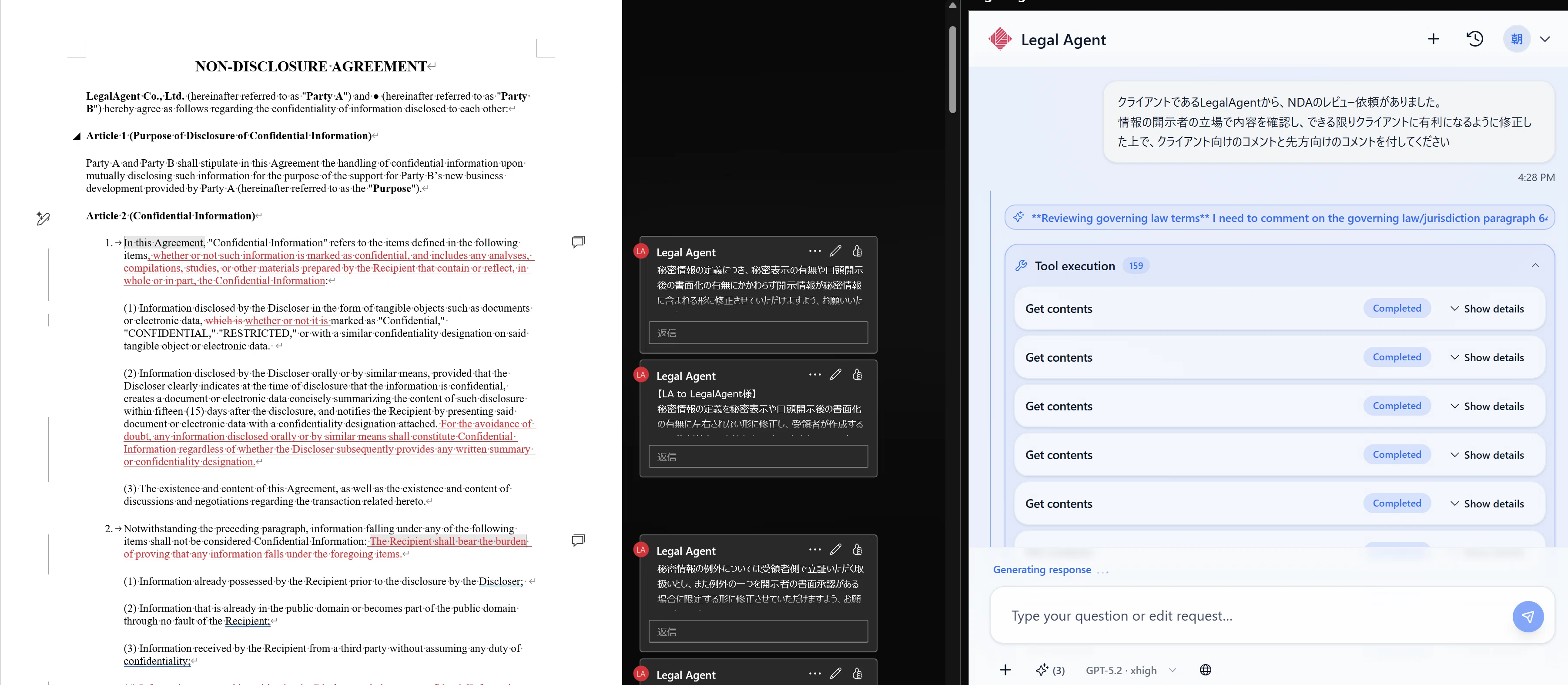
So, with legal practice in mind, where exchanges of revisions and comments occur every day, we developed "Legal Agent," aiming from the outset for a mechanism that lets you use AI directly within the Word screen. In developing it, we made repeated improvements based not on theory but on whether the workload in daily practice actually became lighter.
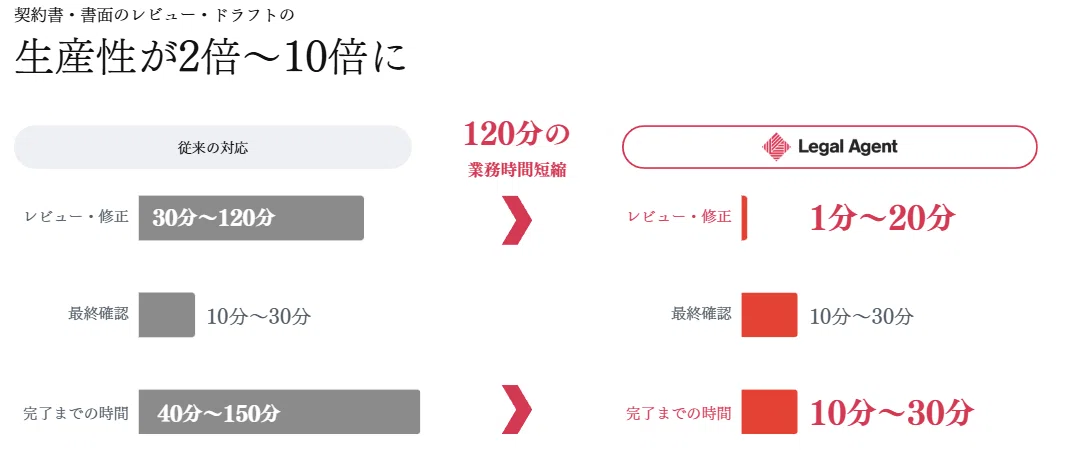
In my own individual work, the way I proceed has changed greatly since adopting this tool. In reviewing investment agreements, which previously took up a great deal of my time, I now sort out the issues and consider the revision approach with the AI and reflect that directly in the document, which has greatly reduced the time spent on preparation. In drafting certified-content letters based on meeting minutes and related materials I have received, and in reviewing English-language contracts and preparing proposed revisions, I also have the sense that I can leave much of the groundwork to the AI. Of course, the time that can be saved and the work required vary with the nature and volume of the matter, but I find great practical value in being able to start the review from a state where a preliminary draft is already in place in Word.

I myself use this tool in practice when handling day-to-day consultations from retainer clients and individual requests. Our current law firm services are based on responding within one business day as a rule, with delivery timing adjusted according to the content and volume of the matter. We have built into our daily operations a workflow in which attorneys carefully verify the preparatory work put together by the AI, and we are seeing results as a means of reducing the practical workload.
Specific Use Cases and Workflow
Legal Agent is a tool that supports editing Word documents and preparing the groundwork for drafting. In none of the use cases does the AI automatically complete everything through to external delivery. The premise is an operation in which a human verifies the proposed revisions and comments against the source materials, laws and regulations, and the premises of the transaction, and finalizes the document.
For contract revisions, you can attach the minutes of a meeting and instruct it to "revise the contract based on the results of the meeting," have the draft reflected with tracked changes, and then check the content against the original minutes. For drafting terms of use, after preparing a template, you can have it refer to the history of exchanges received, service overview materials, meeting content, terms of use from similar matters and so on, and instruct it to "review the materials received and draft terms of use," to produce a first draft.
For contracts with many rounds of exchanges with the counterparty, if you instruct it to "review the counterparty's proposed revisions, make the necessary revisions, and add internal comments explaining the intent and reply comments for the counterparty," it will draft replies along with revising the text. You then check whether the revisions address the counterparty's requests and whether internal-only explanations have crept into the replies.
It can also be used to revise share purchase agreements (SPAs) in M&A practice. By opening the agreement, attaching the due diligence (DD) report, the target company's commercial register, shareholder register and so on, and instructing it to "revise the clauses to reflect the findings in the DD report and fill in the designated fields based on the information in the register and other documents," you can prepare proposed revisions based on the relevant materials. Where information on signatories or registration is unclear, such as when filling in signature blocks, it does not enter anything based on guesswork but organizes the content based on confirmed information present in the materials at hand.
For preparing the DD report itself, by opening a template, applying the prescribed drafting rules, attaching contracts received from the target company and past reports, and instructing it to "summarize in table format from the same perspectives as past DD reports and describe the risks and countermeasures," you can create a draft report with tables. It can also handle organizing the history of the target company's shareholders from shareholders' meeting minutes and shareholder registers received and reflecting it in the report.
It can also be used to prepare signature blocks when executing contracts and to create proposed revisions and comments for long English-language contracts. For briefs in litigation, it supports the groundwork of organizing arguments from the opposing party's briefs and rebuttals, meeting records and evidence.
Four Steps to Get Started
Getting started involves the following four steps. If your Word installation is managed by your organization, please first check whether its settings allow add-ins to be added.
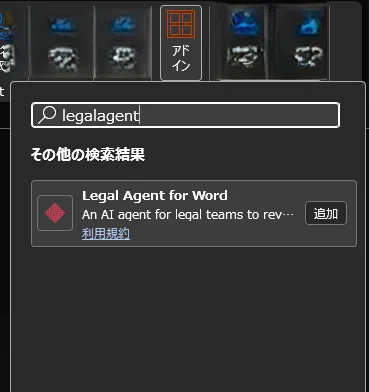
- Select "Add-ins" on the "Home" tab in Word and enter "legalagent" in the search field.
- Add "Legal Agent for Word," which appears in the search results, to Word.
- On the login screen, choose a Google account or a Microsoft account and log in.
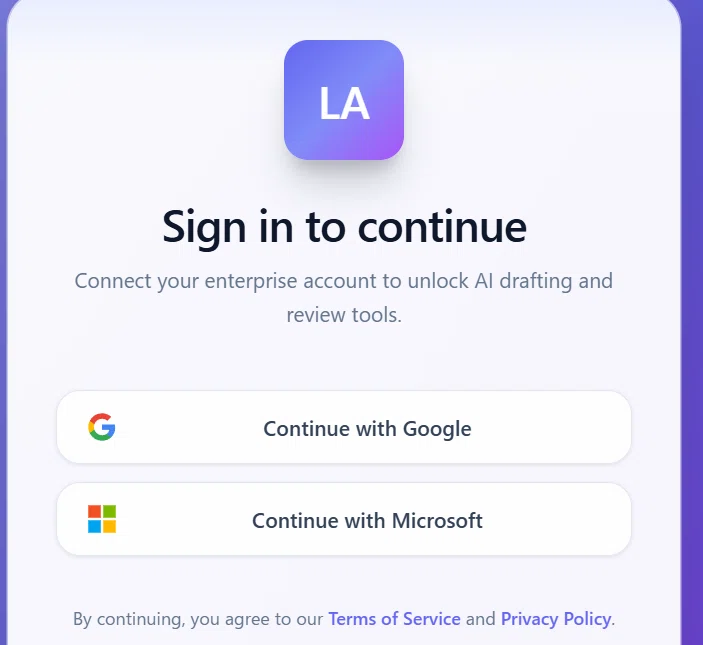
- Once authentication is complete, you can try the features on the Free Plan. No complicated setup is needed for an initial check of how it works. Note that, depending on your usage environment and your organization's administrator settings, prior permission may be required to add the add-in, so please check according to your environment.
Legal Agent is a tool designed to reduce the workload of Word-centered legal practice. Think of it as having a reliable supporter beside your screen, and first try out how it works through the Free Plan.
Services connected to this topic