LegalAgent for Word
 Legal Agent
LegalAgent for Word — Word AI Agent for Modern Legal Workflows
Legal Agent
LegalAgent for Word — Word AI Agent for Modern Legal Workflows
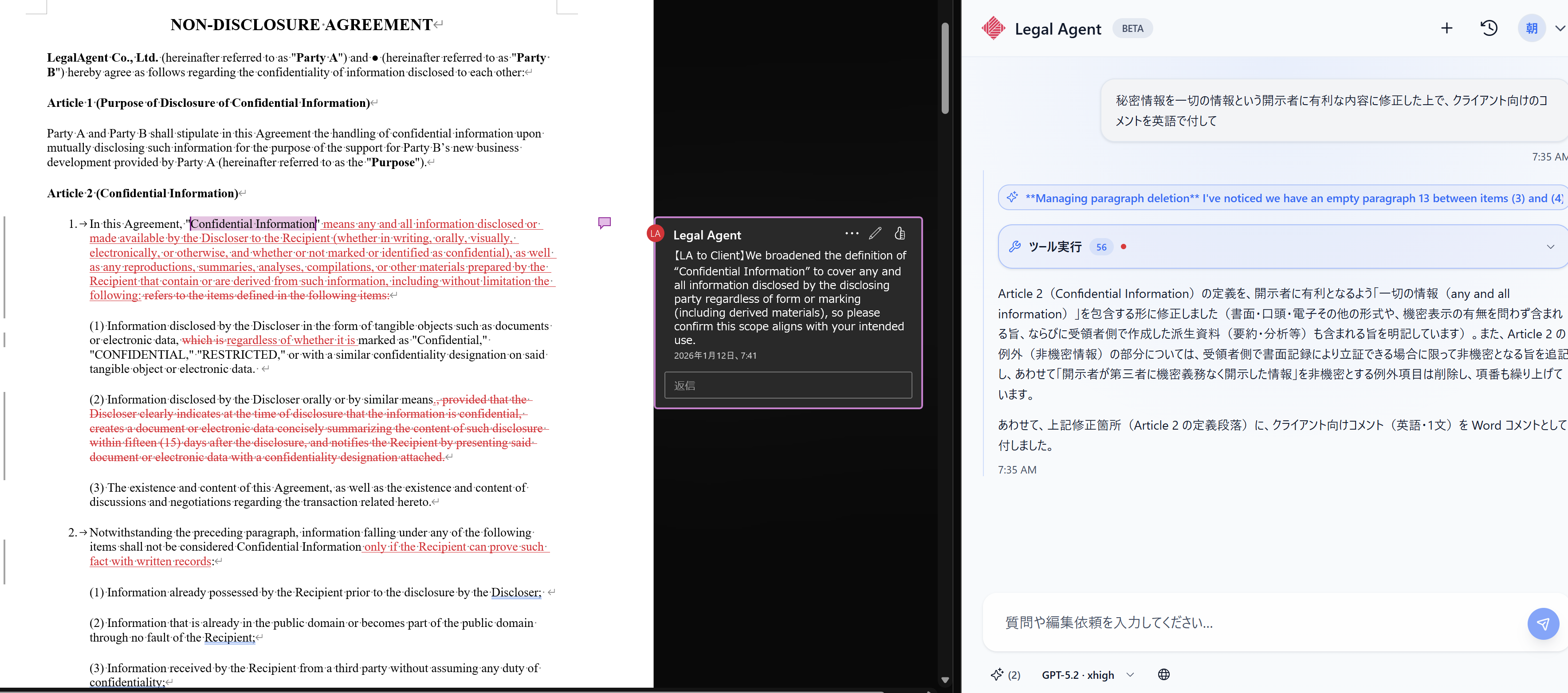
LegalAgent for Word is a legal-focused AI Agent that's truly usable in real legal practice.
LegalAgent for Word lives inside Microsoft Word, supports contract review, redlining, tracked changes, clause analysis and inline comments based on your instructions.
Your dedicated, expert associate — right inside Word.
LegalAgent for Word makes contract editing and drafting 10× more efficient.
Living inside Word, LegalAgent for Word works alongside you 24/7 from anywhere.
Powered by free-form natural language instructions, it references your past revisions and performs contract editing, commenting, redlining, tracked changes and review directly in your Word file.
LegalAgent for Word fits into your existing workflow — keep working in Word as you always do.
Free, Pro, and Max plans for individual professionals.
Starting at $0/month, let LegalAgent for Word handle the editing and drafting work — so you can focus on the substantive legal work that needs your expertise.
Team Business and Team Business Plus plans for legal departments and law firms.
Shared credits across team members and playbook application elevate the entire team's legal output.
LegalAgent for Word references your past contract edits and revision history to provide consistent suggestions aligned with your firm's specific context and judgment criteria.
Uses Word's native comments, redlines and tracked changes to clearly communicate edit intent and risk points. Hand off seamlessly to reviewers without losing context.
Applies clause analysis to highlight important issues and key changes for visual clarity. Spot the points requiring judgment instantly during review.
LegalAgent for Word learns your individual editing style and preferences. The more you use it, the closer it aligns with your personal review standards.
Tailored suggestions based on your company's policies and industry-specific conventions. Beyond what generic AI can offer — practical, real-world recommendations.
Attach related documents to provide context, or connect Google Drive to reference past matters directly. Higher-precision edits backed by complete information.
LegalAgent for Word's Team Business and Team Business Plus plans offer the features law firms and legal departments need to manage and elevate the entire team's quality.
Beyond user management, dashboards let you monitor each member's credit usage. Credits are pooled across the team — adding light-usage members doesn't increase your bill.
Save your firm's playbooks as prompts and apply them across the team. As playbook-based contract review, it keeps reviews aligned with your firm's standards and minimizes quality variance between operators.
Junior team members can ask basic questions to the AI without hesitation, even ones they'd hesitate to ask senior colleagues. Combined with prompt application, this raises overall junior capability.
Reviewers can efficiently review junior output through LegalAgent for Word. Dramatically improves reviewer productivity and lifts the team's overall output.
$0
$199 / month
$998 / month
$598 / month
$1,650 / month
※ Customers based in Japan are subject to additional consumption tax
Install "LegalAgent for Word" from the link below, or directly from Word's add-in store
Open in Microsoft AppSourceFrom the Add-ins option in your Word Home tab, search for "LegalAgent for Word" or "LegalAgent"
Install "LegalAgent for Word" directly into Word from the search results
Sign in with your Google account or Microsoft account
Once you're signed in, you're ready to go. Open Word and try LegalAgent for Word right away

※ Selected clients shown. Order is random
No. We never use your contracts or document content to retrain our AI models
You can be up and running on the same day. Install LegalAgent for Word from Microsoft AppSource, sign in, and start using LegalAgent for Word immediately
We retain operational logs and chat history for service operation. Document content is temporarily cached and deleted within 24 hours. We do not retain or reuse your documents long-term
All external communication is encrypted, and all stored data is encrypted at rest. With proper user management, only the logged-in user can access their own chat history
Yes. Generative AI cannot fully eliminate the possibility of hallucinations (plausible-sounding errors), so you should always review and verify the AI's output for accuracy
Yes. We offer Team Business and Team Business Plus plans for legal departments and law firms. Please contact us for details
For inquiries about LegalAgent for Word, including the Team plans, please reach out via the form below
LegalAgent for Word is a product provided by LegalAgent, Inc. It is an add-in for Microsoft Word, but it is not a Microsoft Corporation product.